SpaceWeatherLive
- 4.1
- Rating
- 500.00K
- Installs
- Free
- Price
 Analysis by App-foxy
I use weather apps to answer practical questions quickly, but SpaceWeatherLive serves a very different kind of curiosity. It is a free weather app from Parsec vzw focused on aurora forecasts and solar activity rather than rain, temperature, or pollen. After spending time with it, I found it most useful as a specialist monitoring tool: it helps me understand whether the sky may become interesting, what is happening on the Sun, and how much confidence I should place in an aurora forecast.
That focus is both its biggest strength and its first warning. If I simply want to know whether I need an umbrella, this is the wrong download. If I enjoy astronomy, photograph the night sky, follow geomagnetic activity, or want more context than a simple “aurora possible” notification, it offers a much richer experience. The app has earned a 4.1 average from around 2.1 thousand ratings and has passed half a million installs, which gives it a meaningful user base without making it feel like a mass-market weather replacement.
What the app is really for
The name can make it sound like a general space-news application, but I think of it more as a dashboard for solar conditions and aurora planning. Its information is aimed at people who want to look beyond a colored probability map. Instead of treating the aurora as a mysterious yes-or-no event, the app encourages me to follow the activity that can influence visibility.
You May Also Like

 Blood Strike: 2.5 Anniversary
Blood Strike’s Loadouts Turn Every Drop Into a Tactical Gamble
A close look at Blood Strike’s custom loadouts: how fast access to signature weapons reshapes its battle royale rhythm, rewards preparation, and narrows the gap between fights.

 Pandora - Music & Podcasts
Pandora’s Music Is Easy to Start, but Harder to Recover
Pandora’s strength is its low-effort path from a seed to a station. Its weak spot is how much confidence it asks you to place in connection, setup, and quiet recovery.

 8 Ball Pool
 Is Built on Rivalries, Rematches, and Routine
A close look at the rivalries, rematches, shared routines, and unanswered safety questions that turn a quick pool match into a persistent mobile community.

 Samsung Music
’s Quiet Strength Is Playing What You Already Own
Its reach comes less from spectacle than from dependable access to a personal library. That simplicity is both the app’s strongest retention engine and its ceiling.

 AccuWeather: Weather Radar
AccuWeather Review: A Quick, Clear Forecast for Everyday Decisions
For everyday plans, the best forecast is the one you can understand quickly. AccuWeather makes rain timing, radar, and local conditions easy to act on, with a few trade-offs.

 Hill Climb Racing
Why Hill Climb Racing Still Turns Crashes Into One More Run
A tiny car, a bumpy hill and one more upgrade: Hill Climb Racing keeps resurfacing because its simple chaos makes every near-miss feel personal.
More From Our News Desk



That distinction matters in everyday use. A normal weather app may tell me that clouds are expected to clear, but it will not normally help me judge whether geomagnetic conditions are worth watching. SpaceWeatherLive brings those two decisions closer together, although I still need a separate local forecast to assess cloud cover, precipitation, visibility, and street lighting around my location.
I would recommend it to a beginner who is willing to learn a few solar-weather terms, but I would not call it completely effortless. The first visit can feel dense because the subject naturally involves several measurements and forecast ideas. The app becomes much more approachable when I use it with one clear question, such as “Is tonight worth checking?” rather than trying to understand every panel at once.
Why the solar information adds value
The strongest part of the experience is the connection between current solar activity and the possibility of auroras. A simple forecast can be exciting, but it can also encourage unrealistic expectations. By presenting a broader picture of solar conditions, the app gives me a reason to keep watching instead of relying on a single prediction.
This is particularly helpful when planning a late-night drive. I can check the app before leaving, compare the solar outlook with a conventional cloud forecast, and then decide whether the trip is sensible. That workflow is more reliable than opening an aurora map alone. A promising space-weather signal is not enough if the sky is cloudy, the Moon is bright, or the viewing location has too much artificial light.
One useful habit is to treat the app as an observation aid rather than a guarantee. I look for a consistent story across the available indicators, then confirm the practical conditions elsewhere. This prevents the common mistake of interpreting one dramatic-looking value as proof that an aurora will definitely be visible from my backyard.
Learning the interface without getting overwhelmed
My advice for a first session is to begin with the current overview and resist the temptation to decode every technical label immediately. I first identify whether activity is quiet, elevated, or changing, then I move to the forecast information. Only after that do I explore the deeper solar details. This order makes the app feel like a decision tool instead of a wall of specialist data.
It also helps to separate three questions: what is happening now, what may happen soon, and whether my own sky will be clear enough to see anything. SpaceWeatherLive is strongest on the first two. The third still requires local weather information and personal judgment. Keeping those jobs separate is one of the most important ways to avoid disappointment.
The app is available at no charge and is rated for Everyone, so it is easy to try without committing money or exposing a younger user to an unsuitable content category. The current version is 1.9.1, and it runs on Android from version 6.0 onward. Those details make it accessible to many older devices, although people using a very old phone should still expect that a data-heavy specialist screen may feel less comfortable than a minimal weather widget.
Trust begins with understandable expectations
For me, trust in a forecasting app is not just about whether the charts look convincing. It is also about knowing what the app is designed to do, what decisions remain mine, and whether I can use it without handing over more control than necessary. SpaceWeatherLive makes the first point fairly clear through its narrow purpose: it is an aurora and solar-activity tool, not a complete replacement for local weather services.
That clarity reduces one common source of confusion. I do not expect it to tell me whether a hiking trail is safe, whether roads are icy, or whether a storm is approaching my town. I use it for space weather, then bring in other sources for ground-level conditions. A specialist app is easier to trust when I do not ask it to answer questions outside its scope.
The developer is Parsec vzw, and the app has been available since September 7, 2018. Its continued presence and established audience make it feel less like a disposable experiment, but I still judge each forecast on its quality and context rather than assuming longevity guarantees accuracy. Solar conditions can change, and an app cannot remove the uncertainty built into forecasting a natural event.
Controls, permissions, and the choices I would check
When I install a data-focused app, I pay attention to the permission prompts and any settings that affect alerts, location, or background activity. I do not enable a permission simply because an app asks for it. For SpaceWeatherLive, my preferred approach is conservative: allow only what is needed for the way I intend to use it, and review notification choices instead of accepting every alert by default.
This matters because an aurora app can easily become noisy if I treat every update as urgent. I would rather receive information that supports a real viewing plan than be interrupted throughout the day by changes I am not going to act on. Turning alerts into a deliberate choice is a small but important part of keeping the app useful.
I also recommend checking the app’s own settings after installation rather than assuming the first configuration is ideal. Look for ways to control notifications, units, location behavior, or display preferences where available on the device. I avoid claiming that a setting exists until I can see it clearly, but the broader principle remains sound: the best privacy choice is the one I make consciously, not the one I accept automatically.
There is another practical trust issue: in-app purchases range from $0.99 to $9.99 per item. The app is free to start, but I would still inspect any purchase screen carefully before confirming anything. That does not make the app poor value; it simply means free installation and optional paid items should be treated as separate decisions. I can explore the core experience first and decide later whether an extra is genuinely useful to my routine.
Handling location and other sensitive moments
Aurora forecasting becomes more useful when it reflects where I am, but location is also one of the most sensitive pieces of information an app may handle. I prefer to share the least precise location that still supports my purpose. If I am checking broad regional conditions, I do not see a reason to provide more precision than necessary. If I am planning a viewing trip, I can make a more deliberate choice, then reduce access afterward.
I also avoid leaving location access enabled by habit. On Android, I review the permission from the system settings and choose the narrowest available option that fits my use. I check the same kind of control on iOS when using an Apple device. These are device-level choices rather than promises about the app’s internal practices, but they give me a practical way to limit exposure.
Notifications deserve similar attention. An alert about increased solar activity may be valuable when I am actively watching the sky, but it can be irrelevant during work, travel, or sleep. I prefer to enable alerts temporarily around a planned viewing period and disable them when the event has passed. This turns the app into a tool I control rather than another source of background pressure.
Account controls are another area where I stay cautious. I do not create an account unless I understand why it is needed and what it unlocks. If I can use the app’s main information without signing in, I prefer that route. I also avoid entering personal details into optional profile fields simply to make an app feel more personalized. A focused astronomy tool does not need to become a social identity for me to be useful.
A realistic evening workflow
Imagine I am considering a short drive outside the city after dinner. I begin with SpaceWeatherLive to see whether solar and geomagnetic conditions suggest a worthwhile opportunity. I note the forecast rather than treating it as a promise. Then I open my usual local weather service to check clouds, precipitation, wind, and visibility. Finally, I consider the Moon, nearby lights, road conditions, and whether I am prepared to wait outside.
If the solar outlook looks promising but clouds are thick, I stay home. If the clouds are clearing and the activity appears worth following, I choose a darker location and keep the app available for updates. This workflow exposes a subtle strength: the app is most valuable when it helps me decide when not to travel. Avoiding a wasted nighttime trip is just as useful as finding a good viewing opportunity.
For photography, I use the same process but add equipment planning. I check whether I need a tripod, spare battery, warm clothing, and enough time for my eyes to adjust. The app can inform the timing decision, but it cannot replace preparation. That division of responsibility makes the experience more realistic and keeps expectations grounded.
Where it beats ordinary weather apps
Compared with a standard weather app, SpaceWeatherLive offers far more context about auroral activity and the solar events behind it. A general weather service is better for hourly temperatures, rain radar, warnings, and daily planning. It is also usually quicker for a simple glance at local conditions. I would keep both types of app rather than trying to force one to do the other’s job.
Compared with a basic aurora probability tool, this app feels more useful for people who want to understand the reason behind a forecast. That extra context can be educational and can help me decide whether a changing situation deserves attention. The trade-off is complexity. Someone who only wants a simple green-or-red signal may find the additional information unnecessary.
It is also not the best choice for a user who wants a polished lifestyle forecast with sunrise, pollen, air quality, and severe-weather warnings all in one place. Its specialization is precisely what makes it valuable to sky watchers, but that specialization leaves ordinary daily weather tasks to other apps.
Limitations I noticed in practical use
The main friction is the learning curve. Solar-weather information has its own vocabulary, and a new user can mistake technical detail for certainty. I had to remind myself that more panels do not automatically mean a more accurate prediction. The app gives me more material to interpret, but interpretation still takes patience.
Another limitation is that the app cannot solve local viewing conditions by itself. Even a strong aurora signal may produce no visible result from a particular neighborhood. Clouds, light pollution, horizon obstructions, timing, and personal eyesight all matter. Anyone expecting a push notification to guarantee a spectacular display is likely to blame the app for conditions it cannot control.
The free model is convenient, but optional purchases mean I need to pay attention when exploring the app. I would not buy anything during a rushed moment before heading outside. I prefer to use the free experience first, identify a specific limitation, and then decide whether a paid item addresses that limitation rather than purchasing out of excitement.
Finally, the app may be too specialized for casual users. If I only look at aurora information once every few years, a simpler service may be easier to understand. SpaceWeatherLive rewards repeated use because familiarity makes the indicators more meaningful. That is a good trade for enthusiasts, but not necessarily for everyone.
Who should install it, and who should skip it
I think it is a strong fit for amateur astronomers, aurora photographers, travelers heading toward high-latitude destinations, and curious users who want to learn how solar activity connects with what they may see in the sky. It is also useful for someone who already has a local weather app and wants a dedicated second source for space-weather context.
I would suggest skipping it if your only need is a quick rain forecast, a clean widget, or a fully automated recommendation about whether to go outdoors. I would also hesitate to recommend it to someone who dislikes technical dashboards or does not want to manage notifications and permissions. A simpler aurora app may be a better match if convenience matters more than explanation.
For families, the Everyone rating makes the app broadly approachable, and it can become a good starting point for discussing the Sun, Earth, and night-sky observation. I would still guide younger users through the settings and purchases rather than leaving those choices entirely to them. The educational value comes from exploring the information together, not from letting the app run unattended.
My cautious verdict
After using it as a specialist rather than a general weather replacement, I see SpaceWeatherLive as a thoughtful choice for people who want to follow auroras with more context. Its free entry point, focused subject, and established presence make it easy to try, while its technical presentation gives committed users room to learn. The most important benefit is not a promise of a visible aurora; it is a better way to decide when watching the sky may be worthwhile.
I would install it alongside, not instead of, a dependable local weather app. I would keep location and notifications under deliberate control, avoid assuming that every forecast is certain, and postpone any in-app purchase until I understood exactly what I wanted from it. With those habits, the app becomes a useful companion for planning and learning.
My recommendation is cautious but positive: choose it if solar activity and aurora watching genuinely interest you, and give yourself time to understand the information. If you want instant simplicity or ordinary daily weather, choose a conventional weather service instead. For the right user, this is a focused and genuinely informative tool; for everyone else, its specialist detail may feel like unnecessary work.
FAQs for SpaceWeatherLive
01What features does SpaceWeatherLive offer to users?
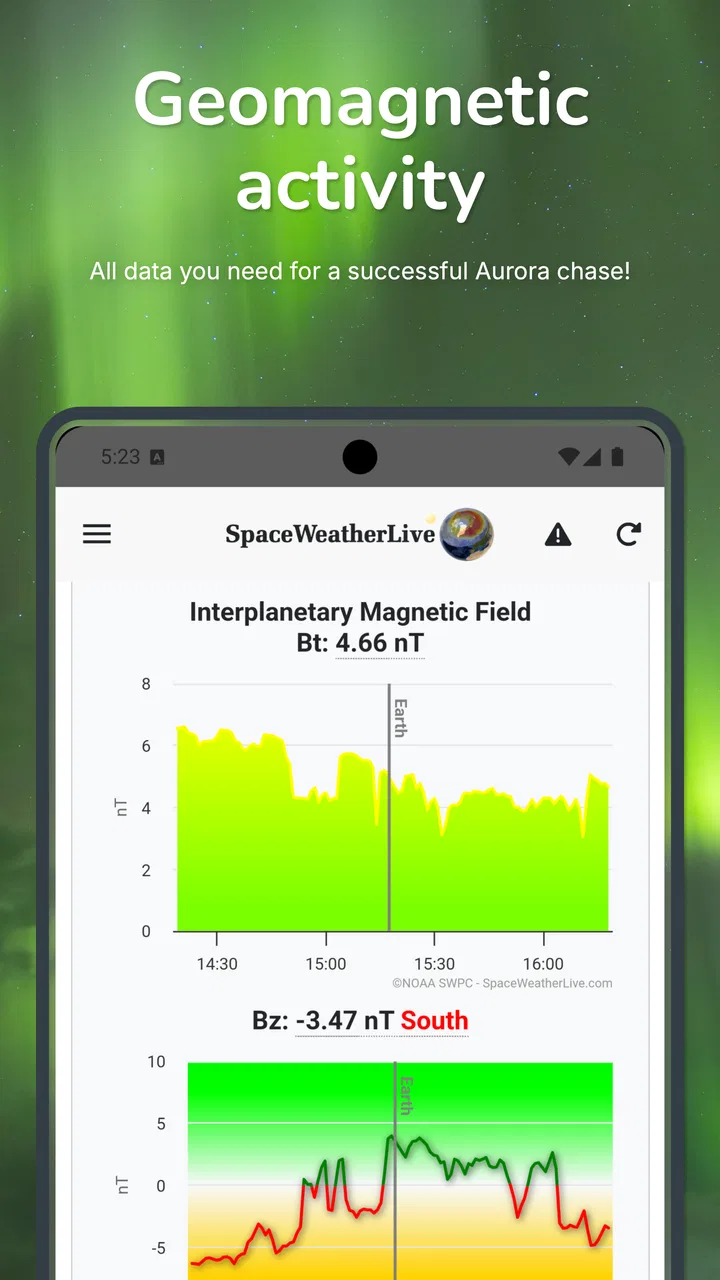
SpaceWeatherLive provides real-time updates on space weather events, including solar flares, geomagnetic storms, and aurora forecasts. Users can access detailed charts, alerts, and historical data. The app is designed for both amateur astronomers and professionals, offering a comprehensive suite of tools to monitor and understand space weather phenomena.
02Is SpaceWeatherLive suitable for beginners in space weather monitoring?
Yes, SpaceWeatherLive is beginner-friendly with an intuitive interface that presents complex data in an easily digestible format. The app includes educational resources and explanations for various terms and phenomena, making it accessible for users who are new to space weather monitoring, alongside more advanced features for experienced enthusiasts.
03How often is the data updated on SpaceWeatherLive?
SpaceWeatherLive provides near real-time updates, with data being refreshed as frequently as every minute. This ensures that users receive the most current information on space weather conditions. The app sources its data from reputable space agencies, ensuring accuracy and reliability for all information provided.
04Can I receive alerts for specific space weather events?
Yes, SpaceWeatherLive allows users to customize alerts for specific space weather events like solar flares or geomagnetic storms. Users can set their preferences to receive notifications via push alerts, ensuring they are informed of significant events as they happen, which is particularly useful for those monitoring auroras or conducting research.
05Does SpaceWeatherLive require an internet connection to function?
While SpaceWeatherLive offers some offline features, such as previously downloaded data and basic educational resources, an internet connection is necessary for real-time updates and alerts. For the most accurate and timely information, a stable internet connection is recommended to fully utilize the app's capabilities.
Pros
- Real-time solar activity updates.
- Comprehensive data for space enthusiasts.
- User-friendly interface for easy navigation.
- Customizable notifications for major events.
- Offline mode for data access without internet.
Cons
- Limited features in the free version.
- Ads may disrupt user experience.
- No interactive tutorials for beginners.
- Occasional data refresh delays.
- Requires internet for real-time updates.

SpaceWeatherLive
Gallery